IRBManager for Submitting Research Protocols
IRBManager is an electronic protocol submission and management system. It utilizes electronic application forms that make it easier for researchers to make necessary edits and collaborate with other K-State investigators and/or students. Protocol information for each researcher is organized on their individual dashboards within the system.
To get started, simply visit the IRBManager website and log in with your K-State credentials. You will be brought to your user dashboard where you will be able to see all of your current research protocols as well as links to the application form to submit a new protocol.
More information on how to use IRBManager to submit and manage protocols can be found in the Investigator Guide.
Quick Tips:
- Starting a new IBC application
To start a new application, log into IRBManager and go to the IRB dashboard. Under either the "xForms" or "Protocols" tabs, select the button that reads "Click here to start an IBC application" shown here:

- Generating a PDF
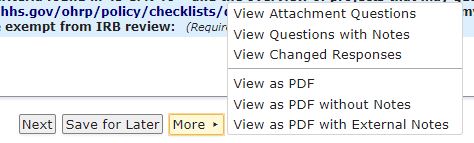
The application form can be turned into a PDF at any time during the completion process, and after the form has been completed. To do so, scroll to the bottom of the page, click "More" and then "View as PDF".
- Submitting a modification
To submit a modification, click the "Copy for Amend" button next to the Application xForm for the protocol in question, shown here:
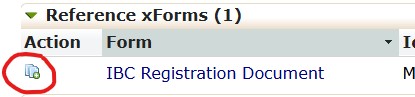
This will open the modification form, where investigators will list the changes that are being made and update the form accordingly.
Resources:
Video Demonstration of IRBManager
If you have any questions about IRBManager, please feel free to call our office at (785) 532-3224 or email comply@ksu.edu.