Ally Student Guide
There is a new tool for students to use in Canvas called Ally. Ally allows you to download lessons and files in different formats based on your learning needs or preferences.
The Ally download buttons look like this, (an "A" with a person and a downward arrow) on full pages,

and like this, (a common download icon) when they are next to files.

When either button is pressed, the same download menu pops up based on the file types available to download for that document (depending on the type and quality of the original document).
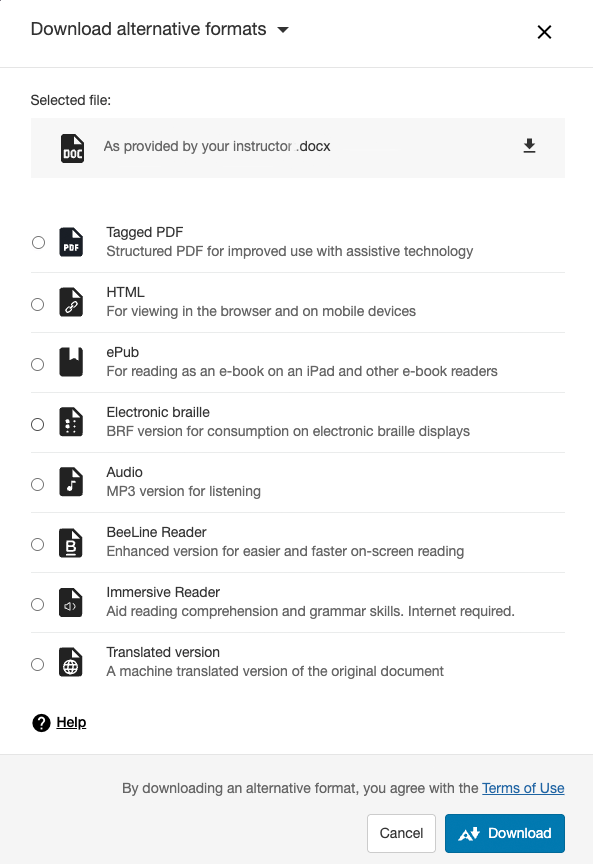
Ally File Type Outputs
Students often require alternative formats for content that offer various accessibility options or cater to individual learning preferences. Ally provides alternative formats to give students more dynamic access to learning content directly from the source document.
 Tagged PDF Video
OCRed and tagged PDF files help students navigate and identify the different sections of the content. Ally provides the option to download OCRed and tagged PDF files for improved use with assistive technology.
 HTML or
  ePub Video
Students have access to reading materials or mobile devices and would like to read the content on those devices. Students can download the HTML or ePub formats for easier reading on those devices.
 Electronic Braille Video
Ally creates electronic braille files for students with visual impairments, enabling them to read the course content on electronic braille displays.
 Audio MP3 Video
If a student prefers audio, MP3 audio versions can be downloaded for listening, enabling a multisensorial learning experience.
 BeeLine Reader Video
Some students are prone to eye strain. Beeline Reader makes reading on screen faster, easier, and more enjoyable. Beeline's eye-guiding color gradients improve focus and can reduce screen fatigue, which is particularly significant for students who are distance learning. Ally lets students download a Beeline Reader enhanced version for easier and faster screen reading.
 Immersive Reader Video
Immersive Reader is a valuable tool that enhances the reading experience by increasing the readability of the content. It features a text-to-speech feature, a tool to highlight nouns, verbs, adjectives, and adverbs, line focus, a picture dictionary, and other great tools to improve reading comprehension.
 Translated Version Video
Some students are taking a course in English, but their native tongue is different. Ally presents the option to download a machine-translated version of the original document.