- K-State home
- Academic Success and Student Affairs
- Advising
- Navigate
- Navigate FAQs
What is Navigate?
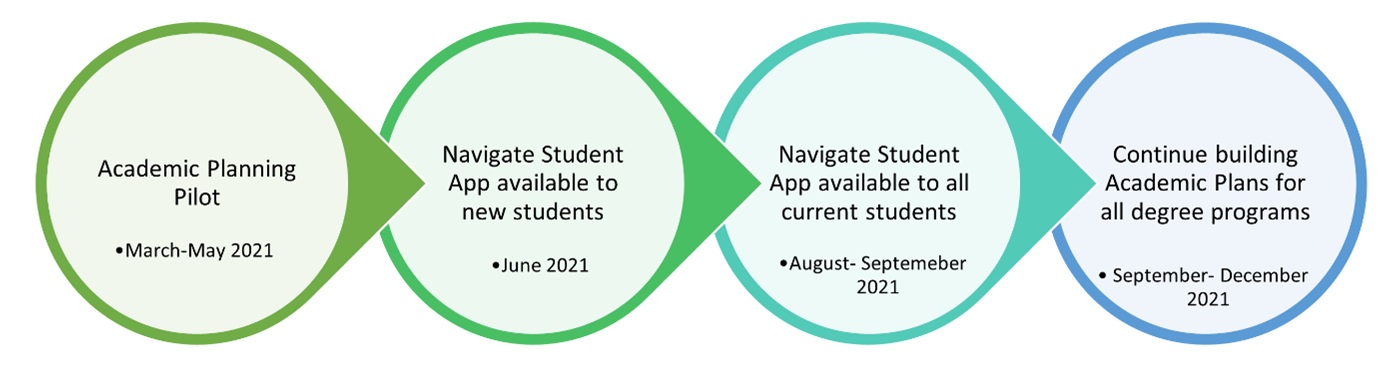
Navigate is a powerful tool that helps you stay on top of important events and deadlines, find and make appointments for services on campus, locate important campus resources, plan and view your class schedule, and even explore different majors. At K-State we are making these tools available to students in phases.
Check out some more frequently asked questions:
You can log into Navigate from the KSIS Student Center or use the SSC link on the K-State Home Page. You will be prompted to sign-in using your K-State username and password. The desktop version of the app is available now.
Contact the IT Help Desk at helpdesk@k-state.edu, or call 785-532-7722 or 800-865-6143.
You use the same eID and password you use to login to KSIS, Canvas, or your K-State email.
Yes! The Navigate app will be available for you to download this summer and fall. For now, students in our pilot academic programs are encouraged to access the academic planning tool via the desktop version of Navigate Student.
There are quite a few programs in the Spring 2021 pilot. Here is the full list
|
College |
Program/Major |
|
College of Education |
Elementary Education |
|
College of Education |
secondary Education Social Studies |
|
College of Education |
Educational Studies |
|
APDesign |
Landscape Architecture |
|
APDesign |
Architecture |
|
APDesign |
Interior Architecture & Product Design |
|
APDesign |
Industrial Design |
|
APDesign |
Regional & Community Planning |
|
College of Technology and Aviation |
Applied Business & Technology |
|
College of Technology and Aviation |
Engineering Technology (MET subplan) |
|
College of Business |
Accounting |
|
College of Business |
Finance |
|
College of Business |
Management |
|
College of Business |
Marketing |
|
College of Business |
Management Information Systems |
|
College of Business |
Entrepreneurship |
|
College of Engineering |
Mechanical Engineering |
|
College of Engineering |
Mechanical Engineering Nuclear Option |
|
Arts & Sciences |
English |
|
Arts & Sciences |
Psychology |
|
Arts & Sciences |
Chemistry |
|
Arts & Sciences |
Sociology |
|
Arts & Sciences |
Mathematics |
The Academic Planner function of Navigate is accessible only through the desktop version of Navigate.
Clicking on appointments will give you a list of options for different services around campus. Choose a type of appointment, a reason, and a service; then you’ll choose a location and a person you’d like to meet with; then, finally, a time you’d like to meet.
Make sure to check several days into the future in case they are just out of available times this week. If you see no times at all, please contact (person) directly to ask about availability. It is possible your advisor has not adopted Navigate for appointments and your inquiry may encourage them to begin!
Please consider choosing an available time, and if none of them work, please contact the person or office directly regarding possible alternatives.