Step by Step Instructions on how to Apply for Graduation
Printer Friendly
-
Video Tutorial
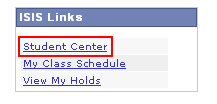
From the KSIS Home Page, to the right, in the
KSIS Links
box, click
Student Center
.
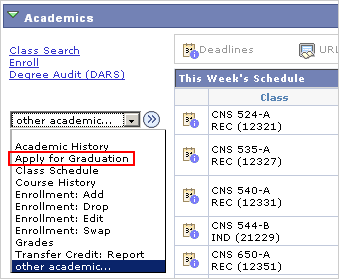
On the left, open the
Other Academic...
list box and click
Apply for Graduation
.
Click the
Go
button.
For each Academic Program, select the appropriate
Expected Graduation Term
, and then click
Continue
.
For each Academic Plan, select
Apply for Graduation
only for those plans in which you expect to graduate, and then click
Continue
.
Make any corrections to your
Degree Name
, and then click
Continue
.
Verify your
Diploma Address
, and then click
Continue
.
Enter your
Hometown
information.
Add any coursework in progress at other institutions that will apply to your K-State degree.
Click
Continue
.
Verify all the information, and then click
Submit Application
.
Updated: 10/14/25