McNair Scholars Program
Ronald E. McNair Postbaccalaureate Achievement Program
The McNair Scholars Program is a comprehensive two-year program structured to prepare undergraduates for successful careers as graduate students, professors, and professional researchers.
The McNair Scholar is an eligible undergraduate with a record of academic success who plans to attend graduate school. Review eligibility at this link.
Growth through support
McNair Scholars' experiences strengthen their graduate applications and prepare them to succeed in the graduate school of their choice. Scholars participate in social and cultural activities to gain a better understanding of academia. They form a learning community of like-minded scholars to support higher academic achievement.
McNair Scholars also benefit from a wide range of services, including:
- Paid summer research internship
- Assistance with undergraduate progress
- Tutoring
- Technology access and assistance
- GRE prep and testing fee assistance
- Graduate school search and application assistance
- Graduate school application fee waivers
- Introduction to resources for financing graduate school
- Offsetting expenses for conferences and school visits
- Connection to special fellowship opportunities
- “There is no going wrong with being involved in this program! They really support and help you understand how to go about grad school. They will also make sure you get to experience new things. They helped me go to Alaska, a place that I have always dreamed about, and without their support I would not have been able to go. They will support you in so many ways that it is hard to describe, and they support each student differently and tailor their support to what that student needs.”
TJ, McNair Scholar and recent KSU grad (BS ‘23)
- “McNair’s goal of helping students is real. They support you in whatever way they can. They offer so many experiences, so don’t hesitate.”
Eresay, McNair Scholar and recent KSU grad (BS ‘23)
- “I now have the ability and confidence to write graduate-level papers and create compelling research posters. My favorite memory of McNair is going to the Heartland McNair Conference because we had the opportunity to network, learn about other people’s research that we otherwise would not, and meet other undergraduates excited about research and grad school.”
Agel, McNair Scholar and KSU grad (BS ‘22)
- “McNair Scholars Program allowed me to work with like-minded individuals...and facilitated networking with various graduate programs across the country.”
William, McNair Scholar and current KSU student
- “The McNair Scholars Program provided me with the skills, experiences, and support I needed to believe that obtaining my Ph.D. wasn’t just a pipe dream, but a goal that I was absolutely capable of and prepared to pursue and accomplish.”
April, McNair Scholar and Ph.D. recipient
- “There’s this whole chapter of your life when you are considering grad school—you don’t know if you can, if you should, or even how. This is what makes McNair so awesome: they help you through it and provide the bit of support and encouragement you need.”
Aaron, McNair Scholar and Ph.D. recipient
- “I owe so much to the staff...Their investment in me as a student, a young professional, and as a friend...gave me the strength to push toward my Ph.D.”
Amanda, McNair Scholar and Ph.D. recipient
More about McNair Scholars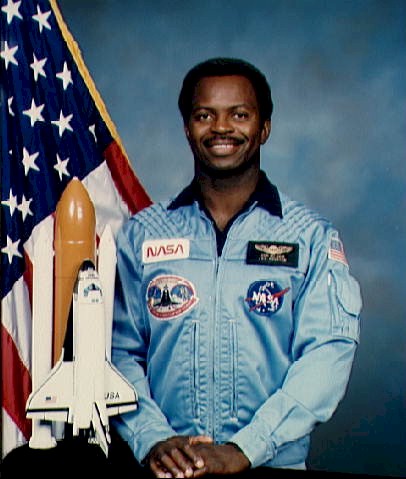
Scholars uphold the spirit of the program's namesake: Dr. Ronald E. McNair, the African-American scientist and astronaut whose life and career were cut tragically short in the 1986 Space Shuttle Challenger explosion. Learn more about Dr. McNair at this link.
The McNair Scholars Program prepares undergraduates for successful careers as professors and professional researchers. Scholars receive support to prepare themselves academically for graduate school, to evaluate graduate programs to apply for, and to complete the graduate application process. This preparation is offered in the form of seminars, colloquia, advising, tutoring, faculty mentoring, and a Summer Research Internship. Scholars conduct original research, write reports, make presentations, and have the opportunity to attend research conferences.
TRIO McNair Scholars Program
334 Hale Library
1117 Mid-Campus Drive North
Manhattan, KS 66506
785-532-3422
mcnair@ksu.edu